↗ More time to learn. Give teachers more time to teach, parents a clearer picture, and students a plan for what comes next.
No adverts. No family subscriptions.
Next bell in
FOR SCHOOLS & TEACHERS More time to teach. Bring lessons, attendance and progress together, so the school day is easier to coordinate.
See a teacher’s day↗ FOR PARENTS Know how to help. See your child’s lessons, homework and progress, so you know where support is needed.
See the parent view↗ FOR STUDENTS Feel ready to learn. Know what’s due, find the right materials and keep completed homework out of the way.
See homework in Bell↗ Real Bell screens. Fictional school data.
FOR TEACHERS AND PARENTS More time to teach. Teachers can organise the day and follow progress in one place. Parents can see what their child is working on and offer support with more understanding.
Everything Bell does for teachers and schools FOR STUDENTS Feel ready Know where to be, what to work on and how you’re doing. Spend less time looking for information and more time learning.
Everything Bell does for students The demo school opens when the platform goes live. Ask for a walkthrough in the meantime.
Original+ Native Editorial Timeline Focus
01 / 05 · Soft glass Original+ Bell’s familiar character. Soft glass, calm cards and a little colour where it helps.
View full screenshot+ Actual Today screen detail · EN
02 / 05 · Rounded and familiar Native A familiar iPhone feel, with soft depth and quiet, rounded cards.
View full screenshot+ Actual Today screen detail · EN
03 / 05 · Warm and expressive Editorial Warm paper, expressive type and space for the day to breathe.
View full screenshot+ Actual Today screen detail · EN
04 / 05 · Arranged around time Timeline Follow the rhythm of your day, with lessons arranged around time.
View full screenshot+ Actual Today screen detail · EN
05 / 05 · Quiet and direct Focus One clear next step. Confident type and fewer distractions.
View full screenshot+ Actual Today screen detail · EN
App appearance only. The same school information in every style.
Light or dark in the app Your choice of accent Follows your text size ONE CONNECTED SCHOOL DAY At your desk. Check the next lesson on your wrist, plan homework at your desk, or catch up on your phone. The countdown to the next bell sits on your Lock Screen and in the Dynamic Island, and your chats and notes can follow you between devices through your own iCloud. Bell runs on iPhone, iPad, Mac and Apple Watch, with a school workspace in the browser.
Bell is on the App Store for iPhone, iPad and Apple Watch. Get it on the App Store , or download Bell for Mac, Android or Windows , with a demo school to try.
One school licence. Bring learning and support together across your school. One annual licence, with no subscriptions for families. The price pays for people's time and the independent review before anything else; hosting is the smallest part of it.
Full pricing, what’s included and payment terms Polish non-public schools €14per pupil / year
About €1.20 a month per pupil, invoiced in złoty once a year by bank transfer. Students, staff and parents included. Minimum about €700 a year.
International schools €14per student / year
About €1.20 a month per student, invoiced once a year. Students, staff and parents included. Minimum €2,500 a year.
Families 0always
Included in the school licence. No adverts. No payment details.
School prices for 2027/28, excluding VAT where applicable. The first three schools to sign for 2027/28 keep a founding rate of about €5.80 per pupil for that year. Quarterly invoicing on request. The first pilot school’s pilot term is free.
What’s included+
A few things
Know what’s next. Start the day knowing where to be and what comes next. Keep lessons, rooms and school changes together, so you can arrive prepared.
Real Bell screens. Fictional school data. Open full-resolution image ↗ See substitutions and room changes when your timetable refreshes, so you can follow the school’s updated plan. Follow alternating weeks, group lessons and school events in the same calendar. Check the time until your next lesson from the Lock Screen or Dynamic Island. It stays quiet on days you are marked away. Glance at a widget or your Apple Watch to find your next lesson without opening the app.
Make a plan. Get it done. See what needs doing and choose where to start. Keep the instructions, files and deadline beside each assignment, so finding the work takes less effort than doing it.
Real Bell screens. Fictional school data. Open full-resolution image ↗ For Bell-school hand-ins, drafts save on your device as you write, so you can pick up where you left off. For Bell-school hand-ins, add your work as text, a photo or a file, then review it before submitting. Use optional homework and exam reminders to plan ahead instead of relying on memory. Keep finished work in Previous homework and choose whether overdue work stays in your daily view. Your personal done marker stays separate from the school’s submission status.
Know where to focus. Understand how you’re doing across your subjects and decide where to put your effort next. Marks stay connected to the scale and weighting your school uses.
Real Bell screens. Fictional school data. Open full-resolution image ↗ Every mark carries the scale it was given on: one to six with weights, one to nine, or a percentage. Where a subject mixes scales, Bell says so instead of averaging numbers that do not belong together. Semester and end-of-year averages follow the school's rule, not a guess made inside the app. Set a target and compare it with your marks to make the next step easier to plan.
Learn at your pace. When your school enables Tutor, ask out loud or in writing, practise a language with conversations and a pronunciation check, and plan your week around tests and grade goals. Flashcards come back just before you would forget them, and answers can include tables, diagrams, presentations and short videos.
Real Bell screens. Fictional school data. Open full-resolution image ↗ The school chooses whether Tutor is available: off, on-device only, or using a student's own provider key. The setting can be pushed from the school's own device management, so it holds on school iPads whether or not the school runs Bell's server. Where two settings disagree, the stricter one wins. Bell never holds an AI key of its own, which is why no AI provider appears on the subprocessor list.
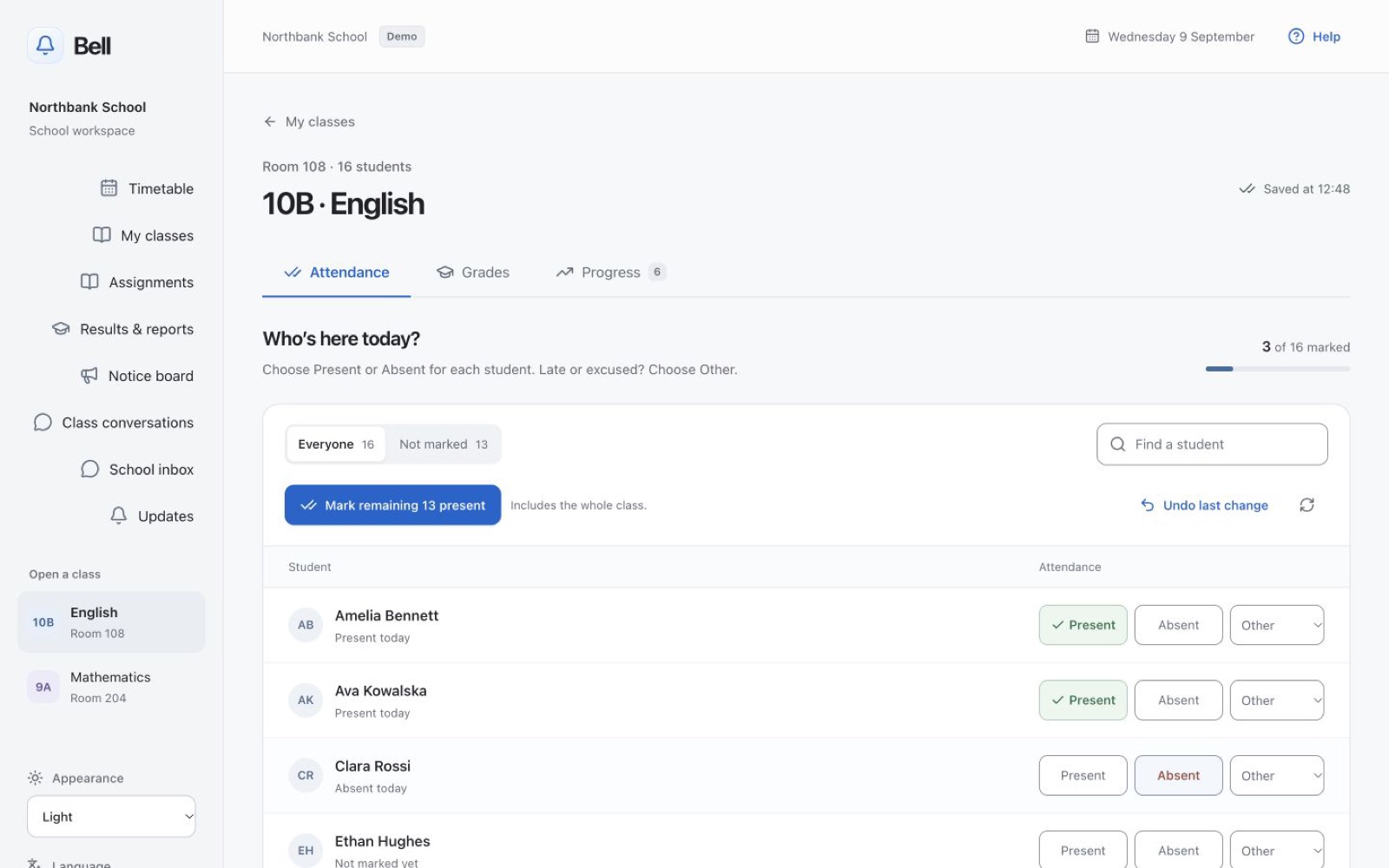
Less admin. More lesson time. Spend less of the lesson taking attendance. Mark the remaining students present in one press, adjust exceptions and undo a mistake without starting again.
Real Bell screens. Fictional school data. Open full-resolution image ↗
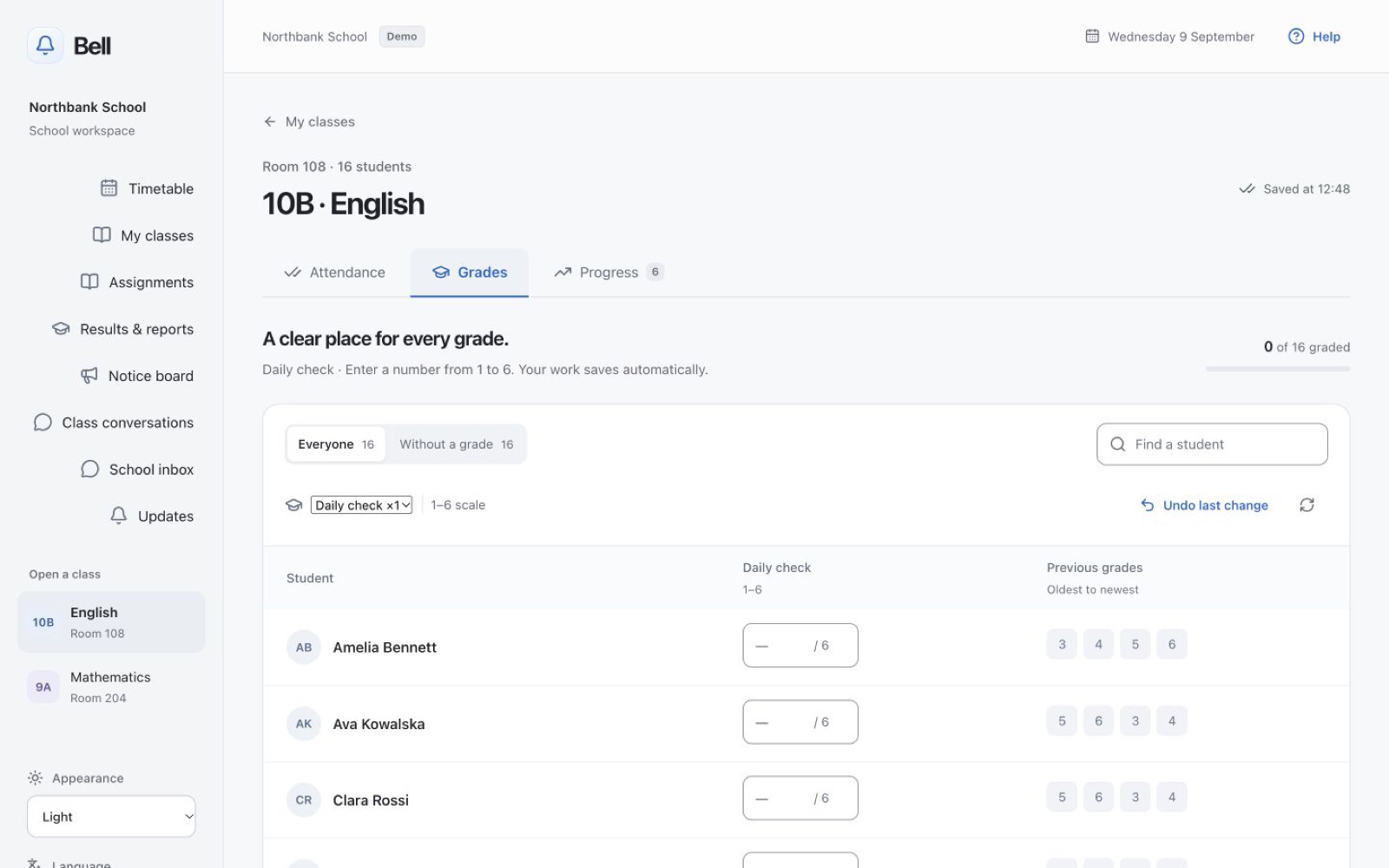
See where support can help. See each student’s earlier marks beside the new one, with the category, weight and scale in view. Keep the context you need to recognise progress and plan a useful conversation.
Real Bell screens. Fictional school data. Open full-resolution image ↗
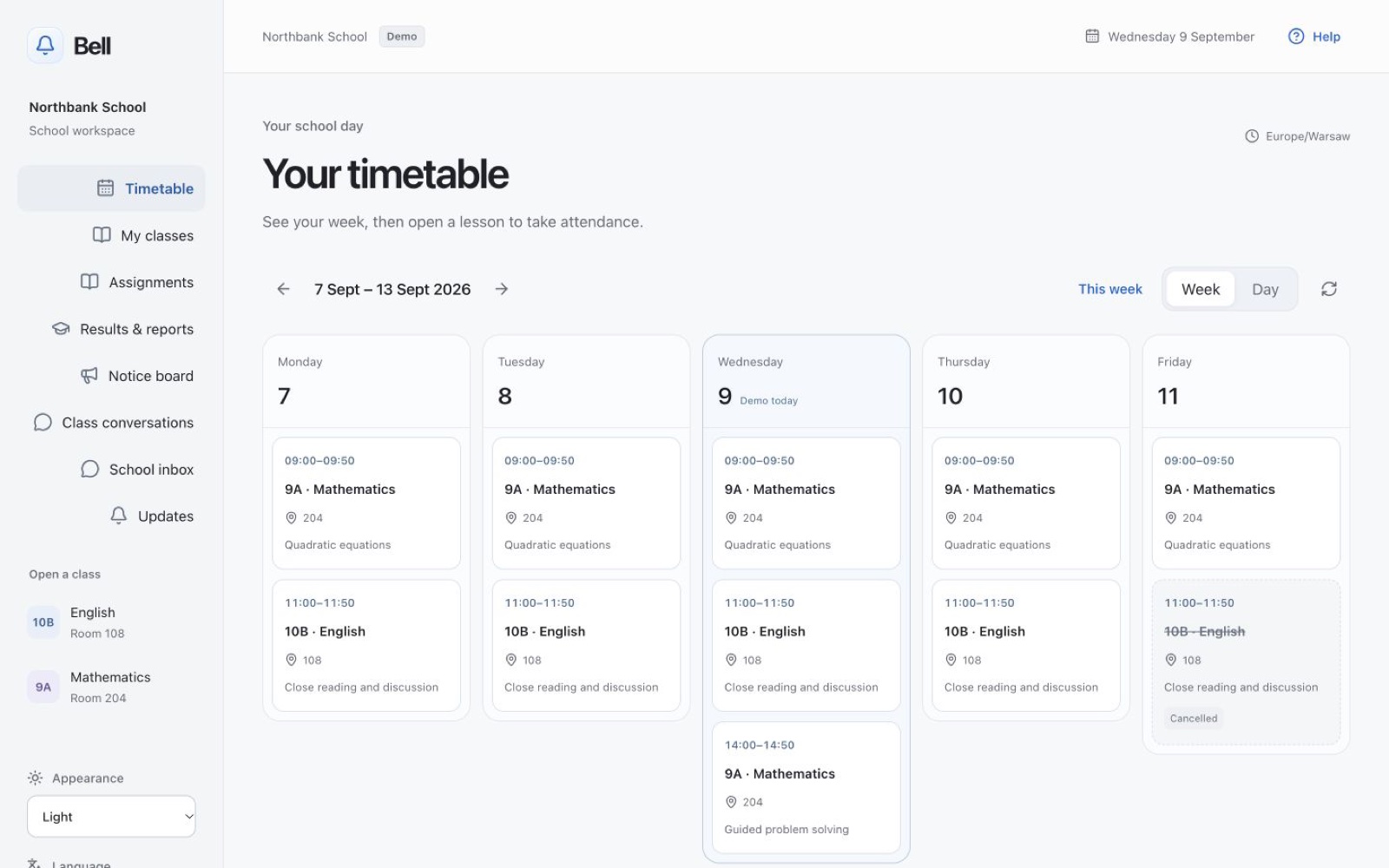
See your week, room changes and cancelled lessons at a glance. Open the register straight from a lesson, so getting ready for class takes fewer steps.
Real Bell screens. Fictional school data. Open full-resolution image ↗
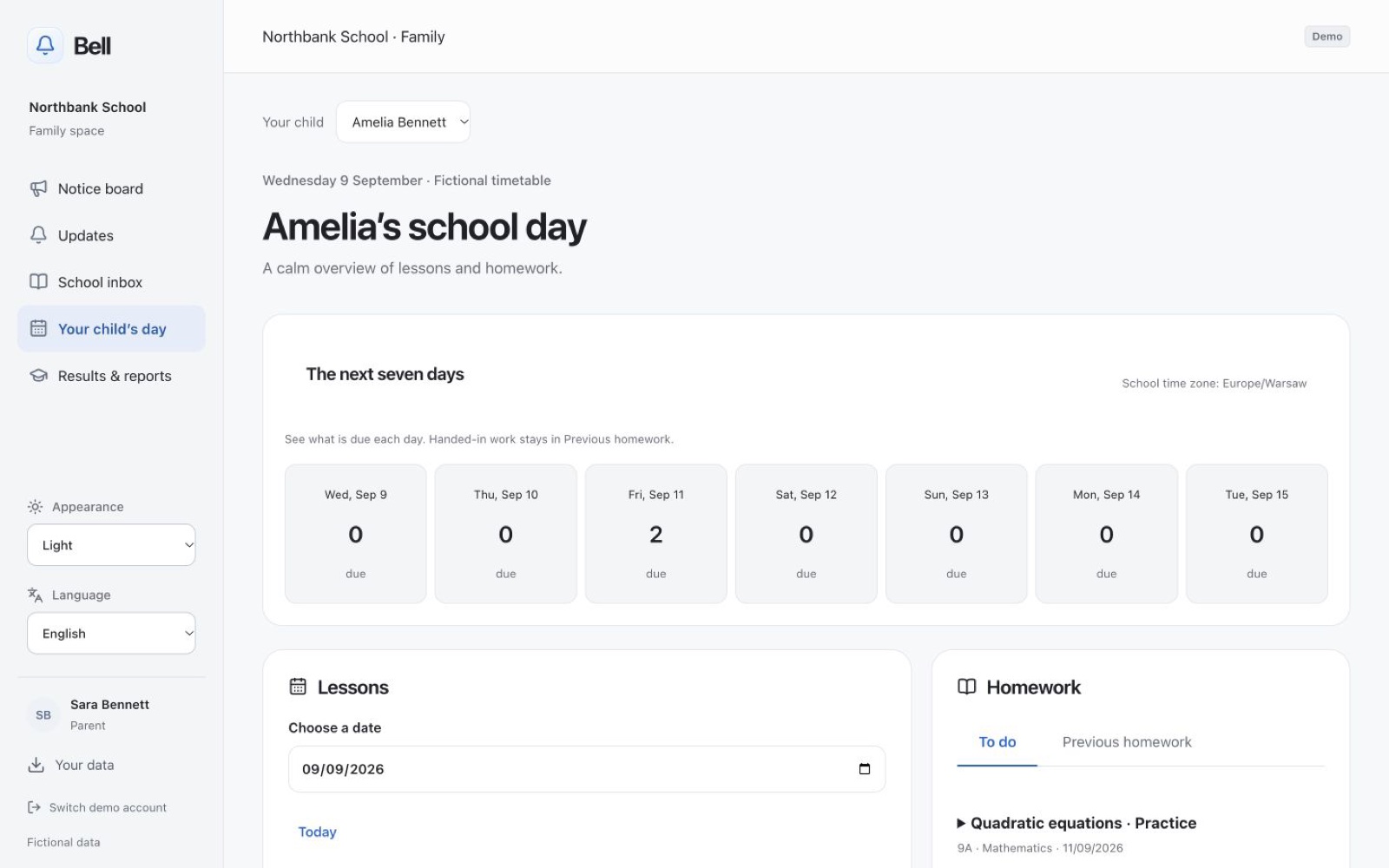
Know how to help. Know what your child is working on, what is due and what their school day looks like. Use the information to plan together and offer help when it is needed. Verified parents see only the information the school shares with their family.
Real Bell screens. Fictional school data. Open full-resolution image ↗
We already use Librus or Vulcan. What happens to it? Keep your current official register during the pilot. Bell does not currently connect to Librus or Vulcan. We agree a small set of tasks to try, such as homework and the school day, and check any authorised imports together. Replacing an official register requires a separate legal and technical assessment; it is not part of the first pilot.
Do families have to pay for anything? No. The school pays for its licence. Student and parent accounts, the web workspace and the iPhone app are included, without advertising.
What happens to our data if we leave? A school can request an export of its records, and people can download the data available to them or send a rights request from Bell. The pilot includes checking that exports and files are usable. Deletion is handled with the school, taking account of required record retention and backup expiry; leaving does not mean every record can lawfully disappear immediately.
What does the study tutor do with our students' work? The school controls whether the tutor is available. The first pilot will keep AI off until the school approves a clear policy. On-device support and external providers have different data flows; external use needs approved terms and a privacy review. A student bringing their own API key does not bypass those requirements.
Do parents need to install anything? No app installation is required for the family web workspace. It works in a supported browser on a phone, tablet or computer. The pilot includes checking the devices families actually use. The optional student iPhone app is included in the school licence.
When can we actually start? We are planning first pilots for spring 2027, followed by paid school licences from September. Dates depend on the security, privacy and operational checks being complete. The first school’s agreed pilot term is free. Writing now starts a conversation and commits you to nothing.
Has anyone independent checked it? An independent security review is still pending. Automated tests cover access controls and key workflows, and a backup was restored into the live database when Bell moved to its EU hosting, with every record checked. A restore that includes files is still to be proven. None of this replaces an independent review or a school’s privacy assessment. These are launch requirements before a pilot uses real student records.
Who is behind it? Bell is built and supported by a student at a Warsaw school. It started with making homework and timetables easier to manage, and now brings that same care to teachers and families. Today it is a one-person project; support and readiness are discussed openly before a pilot.
Security & readiness Readiness reviewed on 22 September 2026. Bell is preparing for a small school pilot. The platform runs on production hosting in the EU; it is not yet approved for real pupil records, which wait for the checks below.
Built and tested Workspaces for staff, students and families, with school- and role-scoped access controls. Production hosting in Frankfurt, in the EU, with a separate staging service and a private database that has no public address. Nightly encrypted backups, copied off site to separate storage, then read back and verified on another machine. Every upload is held until a private virus scanner says it is clean, before anyone can open it. The school sets which file types and sizes are allowed. Anyone in a class chat can report a message; the class’s teachers and school leaders see the report and can take the message down with a reason, or put it back. Before real school data An independent security review, which has not happened yet. Bell’s own sign-in stays off in production until it has. Staff sign-in and account-recovery checks on real devices. Approved school agreements, privacy notices, retention rules and an accurate provider list. The communication and uploads policy, agreed and signed by the school. Still to prove A week of unbroken nightly backups, a restore that includes attachments, notification delivery, physical-device sign-in, and accessibility with real users. School-specific permissions, export and deletion procedures on the deployed system. Support cover beyond one developer. There is no independent audit or compliance certification yet. Schools can request the readiness checklist and draft security and data-flow pack. Talk to us about a pilot.
What’s included One school licence brings students, teachers and families together. For 300 pupils: €4,200 a year, excluding VAT where applicable. Schools in Poland, including international schools in Poland, are invoiced the same in złoty.
How it compares: the established registers in Poland charge families for their mobile apps, about €8 to €12 per child a year on the 2025/26 price lists. In a school of 250 that is about €1,900 to €2,900 of family money a year; Bell’s whole licence for that school is €3,500, with families included. UK per-pupil school platforms publish a base fee plus a price per pupil (2024/25 procurement filings): about €22 to €34 per pupil for a secondary school of 250 at the September 2026 exchange rate. Bell has no base fee. Sources and dates on request.
The office, teachers, students and families are included, with a workspace suited to each role. The student iPhone app is included too. There are no feature tiers or separate parent subscriptions, so families can stay involved without another bill. The annual price follows your pupil count, with a minimum of about €700 in Poland (€2,500 at the international rate) so that a small school still funds the support it gets, and no maximum. The agreed order confirms the count, scope and any applicable tax. Standard onboarding and support are included: a named address answered within two school days, and a weekly report through your first term. Bespoke migration or integrations need a separate agreed quote. Invoiced once a year by bank transfer from September 2027, quarterly on request. The first three schools to sign for 2027/28 keep a founding rate of about €5.80 per pupil for that year. The first agreed pilot term is free, with export and exit arrangements agreed before it starts.
Why Bell exists Bell began with a student wanting a clearer view of the school day: what to learn, what to hand in and where to go next. That idea now extends to the teachers and families helping students along the way.
Built by a student at a Warsaw school, with the everyday needs of students, teachers and parents in mind. Every screen on this page is the real app on a real phone. The pupils and the marks are invented; the app is not a mock-up. Your data is yours to take. Download a copy, or ask for the account to go, from inside the app, without writing to anybody. Nobody has ever sold an advert in it and nobody will, because the school pays for the whole thing once a year. Real Bell screens. Fictional school data. Open full-resolution image ↗
What’s new · Support · App privacy · Data & documents · DPA · Security & readiness
Bell for iPhone, iPad and Apple Watch is on the App Store; the Mac app is in TestFlight. Bell is an independent product and is not affiliated with any school it connects to. Screens on this page are the real app with invented pupils.
iPhone, iPad, iPad Pro, Apple Watch, Mac, MacBook Pro, App Store and TestFlight are trademarks of Apple Inc., registered in the U.S. and other countries.